Drum Pads - Beat Maker Go
- 3.0
- Rating
- 50.00M
- Installs
- Free
- Price
 Analysis by App-foxy
I approached Drum Pads - Beat Maker Go as a quick music-making tool rather than a full recording studio. It is a free Music & Audio app from Gismart, built around tapping drum-pad sounds and arranging a beat through hands-on performance. That focus makes it immediately approachable: I can open it, choose a sound set, and start experimenting without first learning a complicated timeline.
That simplicity is also the main thing to understand before installing it. This is not the app I would choose for detailed mixing, multitrack production, or finishing a song for professional release. I see it as a sketchbook for rhythm, a casual performance instrument, and a way to discover ideas when I have a few spare minutes. If that matches what you want, it can be enjoyable. If you expect the depth of a desktop workstation or a complete mobile studio, its boundaries become noticeable quickly.
Starting an idea with a phone-sized drum setup
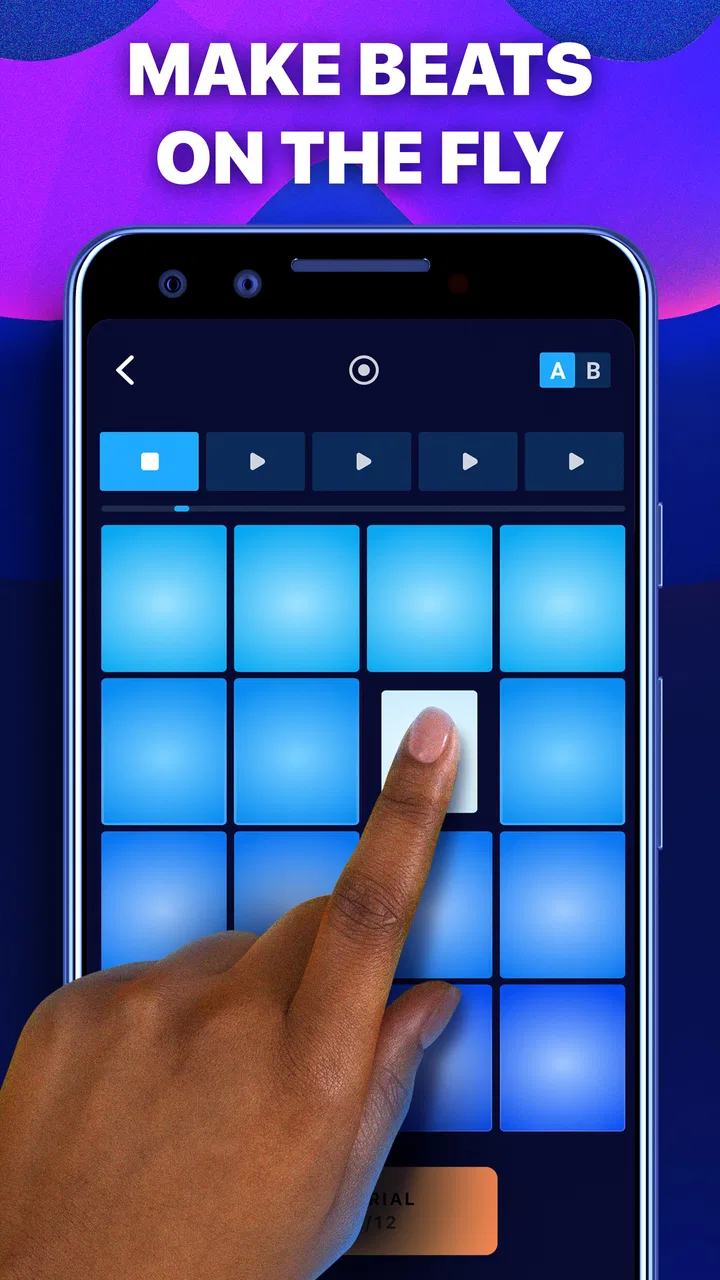
The first useful quality is how little preparation the app demands. A physical drum kit, MIDI controller, or full production app can make a new idea feel like a project before the music even begins. Here, the pad layout puts the emphasis on immediate action. I can tap individual sounds, test combinations, and look for a groove by ear instead of worrying about notation or technical setup.
You May Also Like

 Blood Strike: 2.5 Anniversary
Blood Strike’s Loadouts Turn Every Drop Into a Tactical Gamble
A close look at Blood Strike’s custom loadouts: how fast access to signature weapons reshapes its battle royale rhythm, rewards preparation, and narrows the gap between fights.

 Pandora - Music & Podcasts
Pandora’s Music Is Easy to Start, but Harder to Recover
Pandora’s strength is its low-effort path from a seed to a station. Its weak spot is how much confidence it asks you to place in connection, setup, and quiet recovery.

 8 Ball Pool
 Is Built on Rivalries, Rematches, and Routine
A close look at the rivalries, rematches, shared routines, and unanswered safety questions that turn a quick pool match into a persistent mobile community.

 Samsung Music
’s Quiet Strength Is Playing What You Already Own
Its reach comes less from spectacle than from dependable access to a personal library. That simplicity is both the app’s strongest retention engine and its ceiling.

 AccuWeather: Weather Radar
AccuWeather Review: A Quick, Clear Forecast for Everyday Decisions
For everyday plans, the best forecast is the one you can understand quickly. AccuWeather makes rain timing, radar, and local conditions easy to act on, with a few trade-offs.

 Hill Climb Racing
Why Hill Climb Racing Still Turns Crashes Into One More Run
A tiny car, a bumpy hill and one more upgrade: Hill Climb Racing keeps resurfacing because its simple chaos makes every near-miss feel personal.
More From Our News Desk
View All News


That makes it especially suitable for beginners who want to understand rhythm through their fingers. A new user can try a steady kick pattern, add a backbeat, and then introduce a higher percussion sound to create movement. The learning comes from listening to the relationship between the pads, not from reading a long manual. I found that useful when I wanted to explore an idea quickly and avoid overthinking it.
It also works for more experienced creators as a rough starting point. I would not treat the first beat as a finished production, but I could use the app to test the character of a rhythm before rebuilding it elsewhere. A short tapping session can answer a practical question: does this groove feel energetic, relaxed, heavy, or too crowded? That kind of early decision can save time later in a larger project.
The store summary presents it as a way to become a beat maker with a drum pad, but my experience is more specific: it is strongest when I use it as an idea generator. The app encourages direct experimentation, and that is more valuable than a long list of controls if my goal is simply to get a rhythm moving.
What the first session feels like
I would begin by playing one pad at a time instead of immediately trying to perform a complex pattern. This reveals the sound balance and helps me find which pads naturally belong together. Once I have a basic pulse, I can alternate between a simple foundation and small accents. That approach keeps the beat readable and makes it easier to notice whether a sound is adding energy or just clutter.
A realistic everyday use would be waiting for a train or taking a short break between tasks. I could spend a few minutes tapping out a rhythm, remember the general idea, and return to a more complete setup later. It is not a replacement for focused production time, but it lowers the barrier to capturing a creative impulse. For casual musicians, that immediacy may be the app’s biggest practical advantage.
The Everyone content rating also fits this broad accessibility. I would feel comfortable suggesting it to someone who is curious about beat making but does not yet know which type of music software suits them. At the same time, an accessible rating should not be confused with unlimited creative depth. The friendly entry point is clear; the professional workflow is much less central.
Building a groove instead of just tapping randomly
The easiest trap with a pad app is confusing activity with composition. Rapid tapping can sound exciting for a few seconds, but a useful beat usually needs contrast. I get better results by leaving space between hits, repeating a recognizable foundation, and changing only one element at a time. For example, I might keep the low pulse steady while testing different accents over it. That makes the effect of each change easier to judge.
I also recommend starting at a comfortable physical pace rather than trying to imitate a fast performance immediately. When my hands are tense, timing becomes inconsistent and the beat loses its shape. A slower pattern gives me room to learn the layout, then I can increase complexity through additional hits rather than simply playing faster.
This is one of the app’s less obvious strengths: it teaches arrangement by making the consequences of small choices audible. It does not need to explain every musical concept for me to notice that repetition creates identity and that too many simultaneous sounds can flatten the groove. For a beginner, that is a useful lesson hidden inside casual play.
From first pattern to a usable creative draft
Once I have a starting rhythm, the making process becomes a question of control. I listen for three things: whether the beat has a clear pulse, whether the accents support that pulse, and whether the pattern still feels interesting after repeated listening. The pad interface is good for testing those questions because it keeps me physically involved. I am not just moving blocks on a grid; I am responding to the rhythm as it happens.
That hands-on approach can produce ideas that feel more natural than drawing every hit with a mouse or finger. I can react to the groove and discover an accent by instinct. The trade-off is precision. If I need every hit to land at an exact position, a traditional sequencer with a visible timeline is usually a better choice. This app favors performance and immediacy over detailed editing.
I would therefore divide my workflow into two stages. First, I use the pads to find the character of the beat. Second, if the idea becomes important, I move to a tool designed for arranging, editing, and balancing a complete track. Treating the app as the first stage prevents disappointment and gives it a clear role.
A practical workflow for short sessions
My preferred routine is to create a simple base, perform it several times, and then deliberately remove anything that does not improve the groove. That last step matters. Pad apps can encourage constant addition because every new tap feels like progress. In practice, subtraction often makes the rhythm more useful. A clean pattern is easier to remember, develop, and recreate in another application.
I would also keep a verbal or written note about the idea if I planned to continue later. A quick description such as “slow, sparse beat with a sharp accent” is more useful than assuming I will remember every detail. This is not a criticism of the app alone; it is a sensible habit whenever a mobile tool is being used as a sketchpad rather than a complete project archive.
Another worthwhile technique is to use the app for reference tracks or mood exploration. I can test whether a scene, video idea, or personal project needs a tense rhythm, a relaxed pulse, or something more playful. That makes it useful beyond aspiring producers. Content creators, dancers, and anyone planning a short creative piece may benefit from hearing a rough rhythmic direction before committing to a larger production.
Where the interface helps and where it gets in the way
The pad layout keeps the main action visible, which is helpful when I want to concentrate on timing. I do not have to navigate through several editing screens just to trigger a sound. That directness makes the app feel more like an instrument than a conventional editor.
However, the same design can become limiting when I want to inspect the structure of what I played. A performance-oriented surface does not offer the same reassurance as a visual arrangement view. I may know that a pattern feels wrong without being able to identify exactly which hit caused the problem. For detailed correction, I would rather use a sequencer where I can see, move, duplicate, and delete events with precision.
This is an important trade-off for anyone comparing it with usual alternatives in Music & Audio. A basic drum machine or loop app may provide more repeatable patterns and a clearer arrangement workflow. A full digital audio workstation will usually offer much deeper control over tracks and editing. Drum Pads - Beat Maker Go sits closer to the expressive, immediate end of that spectrum. Its advantage is speed; its weakness is the amount of refinement available after the initial performance.
Iteration: turning a fun beat into a better idea
Iteration is where I decide whether the app has lasting value for my needs. The first pattern is rarely the best one, so I try variations rather than endlessly polishing a single performance. I might remove an accent, change the order of my taps, or create a contrasting section with fewer sounds. Even without treating the app like a full production environment, this process helps me learn what the rhythm is actually doing.
One useful test is to stop playing for a moment and ask whether I can still feel the pulse internally. If the beat depends entirely on constant activity, it may need a stronger foundation. Another is to listen at a lower volume. Overly busy patterns can seem impressive at first because many sounds are competing for attention, but they often become tiring when the novelty fades.
I also pay attention to physical repeatability. If I can perform a pattern once but cannot reproduce its timing a second time, it may be better treated as an inspiration than as the final take. That distinction is valuable when deciding whether to transfer the idea to another tool. The app encourages spontaneous playing, but a deliverable needs consistency.
Three trade-offs worth knowing before relying on it
- Performance versus precision: tapping pads feels immediate and expressive, while exact correction is easier in a timeline-based editor.
- Speed versus depth: I can reach a rough groove quickly, but a more complete production workflow will require another application.
- Discovery versus repeatability: spontaneous patterns can reveal fresh ideas, yet recreating the same timing may take practice.
Those trade-offs explain why I would recommend it differently to two people. For a beginner who wants to learn by doing, the direct interface is inviting. For a producer who already has a precise workflow and needs reliable editing, it may feel more like a side instrument than a central tool.
The commercial model is also worth considering during iteration. The app itself is free to install, while in-app purchases range from under a dollar to amounts approaching seventy dollars per item. I would start with the free experience and judge whether the available creative range fits my habits before spending anything. The important question is not simply whether optional purchases exist, but whether the basic workflow already gives me enough value for the way I intend to use it.
Because the app has attracted over fifty million installs, it is clearly familiar to a very large mobile audience. Its average rating is about three stars, which tells me to keep expectations measured rather than assuming that popularity guarantees a perfect experience. I would read that combination as a reason to try it personally: the concept is broadly appealing, but the fit will depend on how much control and polish I expect from a phone-based beat tool.
Handoff: what happens when the idea needs to leave the app
The most important handoff question is whether I am making a beat for enjoyment or preparing material for another project. For casual use, the process can end with a satisfying performance. I can experiment, enjoy the rhythm, and move on without needing a formal production pipeline.
For a song, video, podcast, dance routine, or social post, my expectations change. I need a reliable way to preserve the idea and continue working on it. A pad-based sketch is valuable at this stage, but I would not assume it replaces recording, arrangement, mixing, or mastering software. I would plan the transition from the beginning: use the app to discover the rhythm, then recreate or develop it in the tool that will handle the final output.
This is also where I would choose a different option if the project needs collaboration, layered instruments, detailed automation, or careful sound balancing. A full mobile workstation is better when the phone itself must be the entire studio. A loop-based app may be preferable when I want fast, repeatable sections without performing every hit manually. Drum Pads - Beat Maker Go makes the most sense when the human act of tapping is part of the creative appeal.
Who should use it and who should skip it
I would recommend it to curious beginners, casual beat makers, and creators who want a pocket-sized way to test rhythmic ideas. It is also a good fit for someone who finds traditional music software intimidating. The free entry point makes experimentation easier, and the Everyone rating broadens its appeal to people who simply want to play with rhythm.
I would be more cautious about recommending it to a musician who needs a complete song-making environment. If your priority is multitrack recording, exact note placement, advanced sound design, or a dependable final delivery workflow, start with a digital audio workstation or a more specialized drum sequencer instead. The pad interface may still be fun, but it should not be mistaken for the entire production chain.
I would also skip it if I dislike learning through repetition and physical timing. The app rewards hands-on practice. Someone looking for instant, perfectly arranged loops may prefer an alternative that emphasizes presets and structured sequencing rather than performance.
My creator verdict after using it as a working tool
Drum Pads - Beat Maker Go succeeds when I give it a focused job: helping me begin a rhythm, test a mood, or enjoy a short beat-making session. Gismart has kept the central interaction understandable, and that makes the app less intimidating than many serious music tools. I can move from a blank screen to a recognizable groove quickly, which is exactly what I want when an idea arrives unexpectedly.
Its limitations are equally clear. I would not build an entire professional workflow around it, and I would not choose it over a timeline-based editor when precision, revision, and delivery matter more than spontaneous performance. The app is better at opening the creative door than at carrying a project all the way through it.
It runs on Android versions beginning with 5.0, and the current version is 2.41.2. Those details make it accessible to a broad range of devices, although the experience will still depend on how comfortable the particular phone is for fast tapping. I would use headphones when judging the beat, especially if I am deciding whether a pattern is balanced enough to develop elsewhere.
My final advice is simple: install it if you want a quick, tactile rhythm sketchbook, not if you are searching for a complete studio. Begin with a sparse pattern, test variations, and treat the strongest result as a draft for your wider creative workflow. Used that way, it offers genuine value. It helps me get from a vague rhythmic impulse to something I can hear, evaluate, and carry into the next stage of making.
FAQs for Drum Pads - Beat Maker Go
01What features does Drum Pads - Beat Maker Go offer?
Drum Pads - Beat Maker Go provides a wide range of features for music enthusiasts, including a variety of sound packs, an intuitive interface, and real-time audio recording. Users can create beats with ease using pre-loaded samples and customize their own sound kits. The app also supports multitouch capabilities and offers tutorials for beginners.
02Is Drum Pads - Beat Maker Go suitable for beginners?
Yes, Drum Pads - Beat Maker Go is designed to be accessible for beginners. It features user-friendly tutorials and a simple interface that makes it easy to start creating music. The app provides step-by-step guides and tips to help newcomers get acquainted with beat-making and music production.
03Can I use Drum Pads - Beat Maker Go offline?
Drum Pads - Beat Maker Go can be used offline, allowing users to create music without an internet connection. However, downloading new sound packs and updates requires connectivity. This feature is particularly useful for users who want to produce music on the go without relying on Wi-Fi or mobile data.
04What are the in-app purchase options in Drum Pads - Beat Maker Go?
Drum Pads - Beat Maker Go offers several in-app purchases, including premium sound packs and additional features. Users can unlock these options to enhance their music-making experience. While the basic app is free, these purchases provide greater customization and advanced tools for serious music producers.
05Is Drum Pads - Beat Maker Go available on both Android and iOS?
Yes, Drum Pads - Beat Maker Go is available for download on both Android and iOS platforms. Users can find the app on Google Play Store and Apple App Store. This cross-platform availability ensures that a wide range of users can enjoy creating music, regardless of their device preference.
Pros
- Intuitive interface for beginners
- Extensive library of sound packs
- Real-time effects customization
- Seamless integration with DAWs
- Supports MIDI controllers
Cons
- Occasional latency issues
- In-app ads can be intrusive
- Limited free features
- Requires high storage space
- Battery consumption is high

Drum Pads - Beat Maker Go
Gallery